AI is already in your business. But is anyone leading it?
One workflow to start. One responsible internal lead. Clear guardrails as you go. Out of Office Connect is a guided 30-day system that helps your team turn scattered AI use — follow-ups, service notes, marketing — into an organized, reviewed approach, then expand only what works.

- Guided online workspace
- Practical templates & guardrails
- One-time purchase
C$995 CAD one-time purchase · applicable taxes at checkout.
Access & refunds: after payment, you’ll receive an email with your private access link and a Resource Bundle download link valid for 30 days. Because this is a digital product, purchases are generally final once access is provided, except for billing or delivery errors and rights that cannot be excluded by law. Access help: support@outofofficeconnect.com. See the Terms.
Watch the 60-second workspace tourYou're running a business. AI shouldn't become another job.
Between scheduling, estimates, service calls and payroll, there's no spare capacity to also become the company's AI department.
Different people, different tools
Team members are exploring AI on their own — different tools, different habits, and no shared approach across the business.
Unclear information boundaries
Customer information must not go into tools that haven't been approved. Without clear rules, well-meaning staff can create real risk.
Every decision comes back to you
You're already managing jobs, customers, technicians and office operations. Without a designated person coordinating adoption, every AI question lands on your desk.
The answer isn't necessarily another AI subscription. It's a practical plan, clear responsibility, and an appropriate way to start.
One internal lead. One guided system. A practical 30-day rollout.
Choose a trusted office manager, operations person, administrator or another capable team member. They don't need to become a programmer.
Your team makes the decisions and does the work; Out of Office Connect provides the structure and materials to coordinate it. It's self-guided — not an ongoing external AI consultant.
- A clear step-by-step path your internal lead can follow
- Decisions and progress saved as you go
- Guardrails and human review built into the process

See the Solution in Action
An online Guided Workspace plus editable and printable implementation resources.
The Guided Workspace walks your internal lead through the program step by step. It saves progress as work is completed, carries important decisions forward, and keeps the full resource library close at hand.
Every purchase also includes the complete editable and printable resource bundle, so your team can work on paper, in meetings, or on screen — whichever fits the job.
Review your existing software before buying more AI.
Out of Office Connect works alongside the AI capabilities in your existing field-service and business software — as an implementation system, not a software integration.
Review what your current tools already offer before buying another subscription. Start with your business processes, check the available features and their information-handling terms, and decide where AI is useful, where human review is required, and where it should not be used. Availability depends on your software and plan; tool and business-use approvals still apply.
What's inside, in four steps
A look at the actual Guided Workspace, followed by overviews of the editable and printable materials.
1. The Guided Workspace
Watch the tour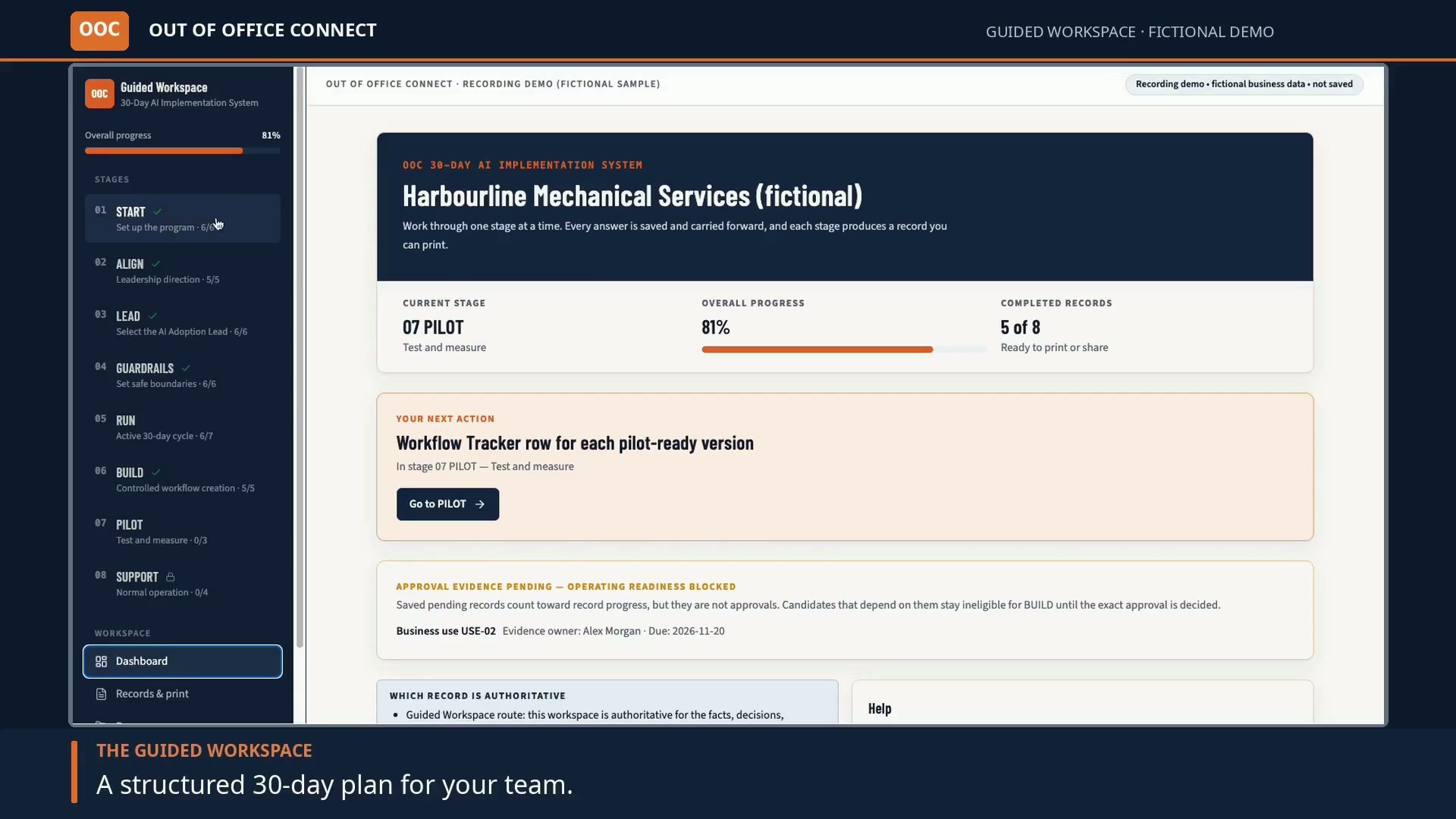
Actual Guided Workspace shown with fictional sample data
Still from the approved product tour: eight stages, saved progress and decisions carried forward. Sample progress is not a customer result.
- Materials overview
2. Policy and guardrail materials
Privacy, security and approval materials that separate approving a tool from approving a specific business use.
- Privacy & Security Checklist
- Separate tool and business-use approvals
- Human review before relying on AI output
- Plan overview
3. The 30-day roadmap
Choose one workflow and one internal lead, set guardrails, run a reviewed pilot, then decide what to expand. Unresolved approvals can extend the timeline.
- START · ALIGN · LEAD · GUARDRAILS
- RUN · BUILD · PILOT · SUPPORT
- A week-by-week working plan, with approval gates
- Selected resource titles
4. Resource Bundle contents
The complete bundle is editable and printable, for working on paper, in meetings or on screen.
- Lead Selection Guide · Ownership Briefing Deck
- 30-Day Implementation Roadmap · Role-Based Workflow Templates
- AI Privacy & Security Checklist · Team Exercises & Adoption Tracker
Text previews summarize the materials; they are not screenshots or reproduced template pages. Full contents are delivered privately after purchase.
Want a free sample first? Get the 7-question “Before You Buy More AI” worksheet.
A clear path from first discussion to controlled use
The OOC Implementation Cycle
People, process, and practical AI.
- 1
START
Set up the people, leadership briefing, and working plan.
- 2
ALIGN
Agree which business problem matters and confirm leadership direction.
- 3
LEAD
Choose a trusted internal lead with the capacity to coordinate the work.
- 4
GUARDRAILS
Set privacy and human-review rules. Tool and business-use approvals are separate decisions.
RUN cycle · BUILD and PILOT take place within RUN
5RUN
Choose a suitable first use, review the options, and plan the 30-day cycle.
- 6
BUILD
Write down the approved workflow for the task once the right approvals are in place. It's not yet a company-wide rollout.
- 7
PILOT
Try the approved process, review the results, and decide whether to GO, REVISE, HOLD, or STOP.
Only when prior business and tool approvals are current.
- 8
SUPPORT
Once the first cycle is approved and complete, check how things are working and make changes when needed.
Continuing review New or changed uses return to the appropriate approval and review steps.
Human review and oversight continue throughout. Progress is not automatic and approvals are not guaranteed. Thirty days is a working target; unresolved decisions may extend it. New or changed uses return to the appropriate approval and review steps.
BUILD and PILOT take place inside the overall RUN cycle — each new use goes through the same controlled path rather than a straight-through approval.
What could this look like in a service company?
Technicians return from jobs with rough notes, and the office needs a clear, customer-ready summary. Your business could evaluate AI assistance for that administrative task — first determining what information can be used, which tool and use are approved, who reviews the results, how it is tested, and what the pilot shows.
A person remains responsible for the final output. Other tasks businesses often consider include customer follow-ups, draft estimates, work-order drafts and marketing materials.
Before any task is approved
- What information can be used — and what stays out
- Which tool is approved for this particular use
- Who reviews the results before they reach a customer
- How the pilot is measured and who decides next steps
Nothing runs automatically. Human review and business approvals remain essential at every step.
What you actually get
Guided Workspace
Structured implementation with saved work
30-Day Implementation Roadmap
A week-by-week working plan
Internal AI Lead Selection Guide
Choose the right person
Privacy, Security & Approval Materials
Clear information boundaries
Controlled Business-Process Templates
Documented, approved processes
Pilot Review & Measurement Resources
Test, measure and decide
Complete Editable & Printable Resource Bundle
Work on paper or on screen
AI tool subscriptions and bespoke consulting are not included. Third-party tools are evaluated separately by your business.
Built for hands-on small businesses
Relevant for businesses with an owner, an office team, and people out serving customers. Broader small businesses are not excluded.
Build the capability inside your own business
Internal ownership
The capability stays inside your business, with a person you chose — not with an outside provider.
Business problem first
You start from the work that actually matters to your company, not from whatever tool is newest.
Guardrails plus human review
Privacy, security and approval rules come before experimentation — and a person stays responsible for the result.
Tool approval and approval for a particular business use are separate decisions — the system treats them that way.
Why we built this
About Out of Office Connect
Small businesses need a practical way to decide where AI belongs in their work. We built Out of Office Connect to support that decision: start with your people, the tools you already have, and one business problem worth addressing.
This is a self-guided 30-day implementation system, not an AI automation platform. Your team appoints a responsible internal lead, sets clear guardrails, and develops one controlled first workflow. Tool approval and business-use approval stay separate; people review the evidence and decide whether to revise, stop, or continue.
About UsA practical investment in getting organized
CAD · One-time purchase
Applicable taxes are calculated and shown at checkout.
- Online Guided Workspace
- Complete editable & printable resource bundle
- Private access link and purchase documents emailed after a successful purchase
Access & refunds: after payment, you’ll receive an email with your private access link and a Resource Bundle download link valid for 30 days. Because this is a digital product, purchases are generally final once access is provided, except for billing or delivery errors and rights that cannot be excluded by law. Access help: support@outofofficeconnect.com. See the Terms.
One-time purchase in CAD. Payment is handled on a secure hosted checkout — card details are never entered on this site.
Frequently asked questions
Do I need technical experience?+
No programming is required. Everyday computer skills and business judgment are useful.
Do I need an AI consultant?+
No dedicated external consultant is required. The program is self-guided, and your team performs the work.
Do I have to replace existing software?+
No. The system works alongside the tools your business already uses.
Does it include AI software subscriptions?+
No. Third-party tools are evaluated separately by your business.
Will it automatically run my office or generate approved estimates?+
No. Human review and business approvals remain essential at every step.
How much time will it take?+
The program is structured as a 30-day program. Actual effort varies and requires participation from your staff.
Can we use confidential customer information?+
Not in unapproved tools. Apply the privacy and security approvals first, before any customer information is involved.
What happens after purchase?+
After successful checkout, your confirmation email includes a private Resource Bundle download link valid for 30 days, plus invoice or receipt links when available from Stripe. For a replacement download link, contact support@outofofficeconnect.com.
What if I need help?+
For questions about your purchase, access, or materials, email support@outofofficeconnect.com or use our contact page. Contact us.